Showing posts with label Internet. Show all posts

Tuesday, January 27, 2015

Can we speed up Mozilla Firefox? Let's try these tweaks! - Tech Tuesday

Hey there! Been more than a while that I posted something on a Tech Tuesday, isn't it? Well I don't get much time, what can I do? And I miss being here a lot! :/ Anyways, lets get to the business, and I welcome you all to my blog on this wonderful Tuesday afternoon!


So today we are here to discuss certain little "tweaks" which can help you speed up your favorite web browser, Mozilla Firefox! These have been discussed at many places, many a times, but not in detail as we, you and I, shall do today. Why are we discussing Firefox? Well, it's my favorite web browser since last 7 years at least! It has topped the charts for years altogether, and being in close competition with the Google Chrome once it was launched. Though, one will have to agree, it maybe the case that home users are preferring Chrome just because of their "Google-Tainted lenses" but for the developer community and also the "Not Google Blind" users, Mozilla Firefox has ruled the day, ALWAYS! So let's get to the discussion.


Trick one: Pipelining


Perhaps, the most talked about, and the most deserving candidate to be on the top of the list is "Enable Pipelining in your Mozilla Firefox to make it faster." Now the point is, how to do that? And ones we learn that, well, what the hell is that?! O_O

How to enable pipelining?


1. Type about:config in the address bar.

2. Double-click network.http.pipelining and network.http.proxy.pipelining so their values are set to true.

3. Double-click network.http.pipelining.maxrequests and set this to 8.

4. Done!

What will this do?


This will dramatically reduce page download times.

Who should do this?


Those who have a fast Internet Connection and use general purpose Internet, should definitely go for it. Don't set the value beyond 8, since there's no point of setting the value beyond 8, and not less than 4, again which'd be pointless. If you have a slow Internet Connection, or you access traffic sensitive websites, which are unable to handle many request at a time, or ban you for a DoS attack if you try to access them again and again, you should not go for pipelining.

What exactly happens behind the scenes?


Normally, HTTP requests are issued sequentially, with the next request being issued only after the response to the current request has been completely received. Depending on network latencies and bandwidth limitations, this can result in a significant delay before the next request is seen by the server.

HTTP/1.1 allows multiple HTTP requests to be written out to a socket together without waiting for the corresponding responses. The requestor then waits for the responses to arrive in the order in which they were requested. The act of pipelining the requests can result in a dramatic improvement in page loading times, especially over high latency connections.

Now all that simply means, you request a page multiple times in one go, making the server respond to all those, thus the responses are combined as one, giving you a faster result. Now since Firefox is capable of sending 8 requests at a time, you should not set the maxrequest value above 8. And also, since Firefox sends 4 requests by default, never make the value go below 4. Always know what you are doing before you proceed, okay?


Trick two: Block Flash


Yes you heard that right! Rather, read that right. Actually flash is such a disaster to memory. Most of the websites have flash content which is of no use. Of course video websites, like YouTube, and all, won't like if you do so(even though they have the workaround of an non-flash video player, thanks to HTML5), still disabling flash is for your own good. Mostly it would prevent annoying ads, or popups in some cases, save you your data, and blah blah blah! Most importantly it would help you to save your Computer Memory, which would let you have a more easy experience with the web browser. You know how to do that? No? Well simple. Get some extension like Flashblock, or go to Addons(Ctrl+Shift+A) -> Plugins -> Shockwave Flash -> Ask to activate. Now Ask to Activate is a safer option than Disable since on pages where you need Flash, you can simply enable them with the help of a ribbon that would run on top asking you to enable flash. Though disabling on the other hand will make you enable it and disable it whenever needed and not needed respectively. This option will disable flash on all pages unless you click on the ribbon and reactivate it.

Trick three: Getting rid of the clutter regularly is a good habit



It would be a good practice to keep your browser clean. Though most of you already do, thanks to tonnes of crap roaming around the Internet keeping your nights busy -_- but still, keeping the cache of firefox clear is a great way to speed up your borwser, your computer, but well, at times reducing the Internet speed at times, because your browser will have to download the old content again just because there was nothing in the cache. But still always keep it clean, it is worth the tradeoff. You know how to do it, if not, it is rather simpler and easier to download CCleaner and let it do the work for you. :)

I guess these are safest tips. I have a huge set of settings that can help you make the performance be even better, but well most of them have associated risks. I will discuss them all in total maybe later when I get more time to do so. For now do these and have fun. These will help you all a little bit, if not a lot.

So now I must take a leave, good day friends. Have fun! :) See you all soon ^_^


Wednesday, May 7, 2014

Reviews of some popular Online Shopping Websites in India May'14 - My Take - Random Wednesday

Hey all my dear readers! Let me welcome you all to my blog on this Random Wednesday at Blog de Toxifier! :D


I was thinking of updating my previous post on Online Shopping Website Comparison. But then I thought It'd be better to make new post with recent happenings and experiences.


So here for you all a "My Take" on the Online Shopping Websites in India. I used May '14 in this post to indicate that this one depends on my experiences upto that period. If I ever post again such a post, it will have a different month and perhaps year.


So let's start :D

Myntra (Myntra.com)


My Rating: 4.5 out of 5
=======================


My favourite destination to buy Fashion Online. Would you believe? I ordered my Adidas Blazon at 8:45 am and received them at 4:45 pm the same day? Yes! They have done the quickest delivery to me of all the Online Shopping Websites O have ever purchased with. But that's not all. I placed an order of around 15 clothes (worth around 20,000) and got them within 36 hours of placing my order! All the packaging was good, and products being genuine too :D

They improved on the speed of their website in past months and their website now loads up superfast! Maybe they read my last review :D They have also improved their packaging and have started to box-pack all the goods they deliver. When I ordered my Adidas shoes, the box of the shoes was ruined. I put that in my feedback, though rest of the things were fine so I gave them 10/10 on everything else that day. A couple of days later, they called me to clarify that they tried to pack the product as good as they could and the box might have been ruined during transportation. I told them it's okay, but they can bubble wrap shoe boxes, and box pack other clothes they deliver which would prevent any such issues. When I purchased something again after a couple of months, I got everything box packed! Last month I purchased a jeans from them, and guess what?! Not only it was packed in a box, but the box was sealed in a thin plastic wrap! For the first time I saw customer feedback being heard by some people! Just too good myntra! :)

Their pricing has improved and are already at par with the offline stores. Moreover, they give coupons year round! So you get everything at a discounted price for sure :D And when they run a sale on their website, well! MYNTRA IS THE BEST then :D I bought a sweatshirt, for example. he price in store during sale season was 2160 INR, but at myntra it was 1300 INR!

Always supporting Cash on Delivery is the main plus point since it is better to pay cash than using Online Transactions which can be risky.

Still I didn't give them 5/5? Well, quick delivery is not just one thing to be considered dear. There are a lot of other things I have to consider before reviewing. They deal just in fashion but still lack a lot of things I would have bought. For example, only a small collection of Mid Rise Jeans by good companies like Wrangler, Levis, etc. If they add more of that, and add my favourite brands like Louis Phillippe and Van Huesen, I am sure to give them a 5/5 :D

I have bought 3 bags, a pair of shoes, more than 15 shirts, 5 women purses/handbags, 5 pair of jeans, and many socks and briefs! LOL! You can say till date I have purchased goods of worth around 50,000 INR from Myntra in last 2 years! Only once had a bad experience , but the customer support was great and helped me. So I give them a 4.5/5(why not 5/5 I have already discussed).

Myntra also features a lot of exclusive and signature brands, like HRX, and Being Human. Apart from that, their own brands are good too.

They have recently started the rewards point system and I got a platinum membership! :D Thus, a lot of points on every purchase, implying a greater discount on my next purchase! :D

Breakup of the rating I gave to Myntra:

Layout 5/5
Speed of Website 4.5/5
Customer Support 3.5/5
Product Availability 4/5
Ease of Use 5/5
Price 4.5/5
Packing 5/5

The average becomes approx. 4.5/5 so good to go, right? :)

Didn't checked my experience with any other reviews so cannot comment what other people feel for this website. Though among my friends, Jabong is more popular, though I personally love myntra! :D

Flipkart (Flipkart.com)


My Rating: 4 out of 5
=====================

The second one on my list is Flipkart, an Indian Shopping Website based in Bangalore, India.


Started with a bad experience, this is one website I now have a great experience with and now consider it to be my top priority. Whenever I need to buy something online I first search it on Flipkart! Earlier whenever I had to see the highest price of the commodity on Internet I consulted Flipkart, now I can find the best and the most competitive price on Flipkart, they have improved a great deal.

I bought 3 mobile phones, an external hard disk, pen drives, watch, accessories, books, and computer supplies etc. through this website at a rate lower than most of the websites. I would say their delivery is fast and packing is good too. I like this website. Greatly recommend it. They use high quality bubble wraps and good boxes to pack the goods. The already box packed goods, are also bubble wrapped and packed in their box which saves the original product box from the slightest nook/bump!

Reason for not giving 5/5 is my past experience of Hard Disk and RAM and bad customer support. Since I didn't contact the customer care after that in any of the purchases, since I didn't need to :D, I won't comment on customer support this time for Flipkart. If they continue to be good now, I might consider a 4.5/5 in my next review perhaps! :)

They have also introduced a couple of new features like In-a-day guarantee (they seem to have been liking Amazon, eh! :P) and payzippy (e-wallet, seems they like ebay too! :O)

Breakup of the rating for Flipkart:

Layout 4.5/5
Speed of Website 5/5
Customer Support N/A -- Can't review --
Didn't require to contact them
Product Availability 4/5
Ease of Use 4.5/5
Price 4.5/5
Packing 5/5

Thus 4 out of 5 is my rating for Flipkart. :)

My friends too have had a great experience of buying from Flipkart. Many people on Internet say they were delivered quickly even at remote locations. So perhaps, my experience is rightly reviewed by me this time too! :D


eBay (ebay.in)


My Rating: 3.0 out of 5
=======================


A website I loved the most, but now I am scared to use! Yes, it is eBay, a popular Online Shopping Website, not just in India but around the world. The prices and coupons make this website a great catch but would lure anyone who thinks it to be too trustworthy like I did.

I won't talk about my bad experience with eBay again, but yes since what happened with my purchase of a calculator, I was taught a lesson to be ultra-cautious while purchasing online. Still I bought a RAM from eBay earlier this year and a couple of mobile accessories. The experience was good to be precise. They have improved themselves. The goods were not packed in seller's packaging, rather eBay had packed them. Seems like eBay too has got some warehouses now to do the work like other websites are doing. My experience has been improved with them since last year, though honestly, I am still scared of buying from them!

Thus, eBay! I give you 3.0 star.

Let's break up this rating that I gave to eBay:

Layout 4/5
Speed of Website 4/5
Customer Support May have improved since my last encounter
Thus no comments
Product Availability 4/5
Ease of Use 4/5

Infibeam (infibeam.com)


My Rating: 4.5 out of 5
=======================


Infibeam is another great Indian shopping Website. It is based in Gujarat, I suppose. My experiences so far with this website have been good. I don't know why, but I just love this website! :D

The packaging of the products is awesome, is just superb. They pack the products so well that there should be no transit-or-handling damages to the product. They would uses so many bubble wrap sheets that the product or it's box will never be damaged! Their outer covering is also good, and the packing bag looks good :D

I have bought Pen Drives, Cooling Pad, Chocolate Syrup, accessories, etc. etc. etc. from this website and the experience has been good so far. They have great customer support and they can hold your shipment if you ask them to do so for a while.

They have a Magic Box page that they update daily at 00:00 (Indian Standard Time). Magic Box @Infibeam features great deals are superb prices!

For a great experience I give Infibeam 4.5 out of 5 stars :)

Breakup of my rating for Infibeam:

Layout 4/5
Speed of Website 4.5/5
Customer Support 4.5/5
Product Availability 4/5
Ease of Use 5/5
Price 4.5/5
Packing 5/5

I didn't search for any reviews on Internet to confirm my experience with that of others. But my friends suggested me this website. They all have had good experiences with this website and say they deliver real quick and have the best prices. And I agree to that all! :D

SnapDeal (snapdeal.com)


My Rating: 4.5 out of 5
=======================


I have had a good experience with everything I bought from Snapdeal. The prices are real cool and delivery is quick and packing is good too. Precisely, the products are priced, 10 or 20 bucks less than Flipkart! LOL! Their minimum order for Free Delivery is less than that of Flipkart.

I have bought earphones, headphones, shaving blades, body lotion, shaving cream, after shave lotions, books, etc. from this website and all my experiences have been good so far. Once had to contact the customer support to delay my delivery since I wasn't home, it was good to contact them. No problems then why not 5/5? Because not everything is available. Things go out of stock, and remain out of stock, sometimes the prices are high, rather than being competitive.

Still this is a good website and I always consider it whenever I buy online.

Breakup of the rating I gave to Snapdeal:

Layout 4/5
Speed of Website 4/5
Customer Support 5/5
Product Availability 3.5/5
Ease of Use 5/5
Price 4.5/5
Packing 4.5/5


Freecharge (freecharge.in)


My Rating: 4.5 out of 5
========================


I guess I am no longer going out of my home to recharge my mobile phone! :D This website is completely awesome. It beats any website that offers online recharge for prepaid mobiles, bill payment for postpaid mobiles/DTH services. They have coupons that discount your evey recharge all the time! :D

That's not all, they got some real good deals which unlock as per your recharge amount. These deals are in the form of coupons which may be available for free or at a nominal fee of 5 to 20 INR with benefits worht 50-200 INR! The scaling is good, right?

The recharges are quick and successful, and in case they are experiencing any problems, they warn you as soon as you enter your mobile number.

I find them totally amazing. As long as they have the cool deals and coupons, they will remain on the top charts! :)

Breakup of the rating I gave to Freecharge:

Layout 5/5
Speed of Website 5/5
Customer Support N/A Not encountered yet
Product Availability 4/5
The special recharges are available less often
Ease of Use 5/5
Price 5/5
due to coupons and deals
Packing N/A

Pepperfry (Pepperfry.com)


My Rating: 4 out of 5
=====================


I have made just one purchase with them as yet, but their deals are quite lucrative. I have not been able to buy from them a lot of times just because a good deal ended in no time! LOL!

I recently purchased a set of Tupperware containers which were no longer available with most local dealers I had contacts with. Moreover, I bout them at a nice price!

My experience with Pepperfry was good. They delivered real fast, and the packing was good. They seem to be more of a furniture destination and their collection is really awesome. Though, furniture never seems to be easy on pocket, so I guess I won't buy furniture online. But Pepperfry seems to be a good website with good deals every now and then. Products like deodrants and soaps are available with them, though their collection features a lot exotic products and supplies (beauty, kitchen supplies, etc.) and not the general ones that are available with the local shops.

Breakup of the rating I gave to Pepperfry:


Layout 4.5/5
Speed of Website 4/5
Customer Support N/A
Not yet contacted/td>
Product Availability 3.5/5
They have more of the exotic stuff
Ease of Use 5/5
Price 4.5/5
Packing 4.5/5

Star CJ (starcj.com)


My Rating: 4.0 out of 5
========================


As yet I have made just one purchase from them, a set of 7 sarees. They were featuring them on television when I ordered it by phone.

The product packaging was really really good. The product was delivered in time, though not quickly. The products were same as were featured on TV and also the quality was worth the price.

The deals are good and the prices is are really nice. They have some exclusively available products in their collection.

Breakup of the rating I gave to Star CJ:

Layout 3.5/5
Speed of Website 3/5
Customer Support 5/5
Product Availability 3.5/5
Ease of Use 5/5
Price 4.5/5
Packing 5/5

I hope the websites won't have any problems with me reviewing them without their consent since these are honest reviews and they should appreciate that people would know about these websites and the websites can improve them if I pointed any flaw. Still if anyone finds any of these reviews bad, please don't sue me(LOL!). Just let me know if you belong to that company and I should remove any content.


I hope everyone who reads this post finds it useful. Please feel free to post your suggestions, comments and reviews in the comments. These reviews are honest and based on my own experiences. I wasn't paid to write them in case you think these are morphed. They are real 100% based on my own personal experience.
Good evening all! :) And happy new month of MAY! :)


Friday, July 19, 2013

Guidelines for Securing Operating System Part 3 - Macintosh

Hey all my dear readers! I hope you all are doing great :) The last two posted were quite Interesting right? Let's continue with the flow and let me bring the Part 3 to that Guidelines Post, the last one in this series of 3 posts.


Please note: This Post is quite Specific to Mac OS X

Enabling and Locking down the Login Window


The following steps would help secure login screen by disabling the auto-login feature. It is a good practice to disable it and enter password whenever you wish to access your PC.
  • Click Apple Menu -> System Preferences -> Accounts -> Login Options -> Display Login Window As -> Name and Password
  • Uncheck Automatically login and:
  • Check Hide the Sleep, Restart, and Shutdown buttons
  • Uncheck Enable fast users switching, if not used


Configure Accounts Preferences


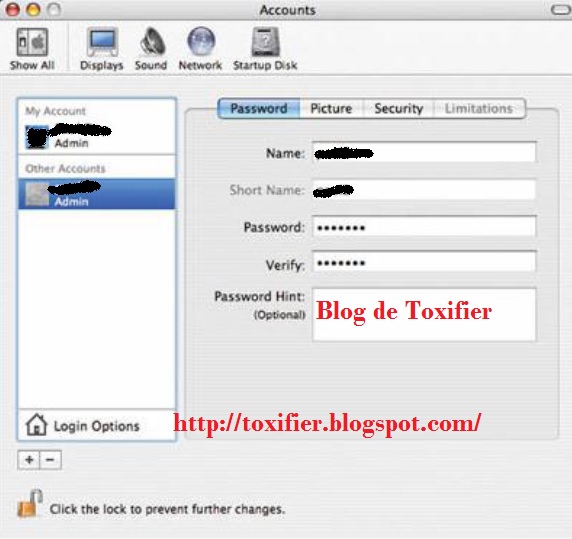
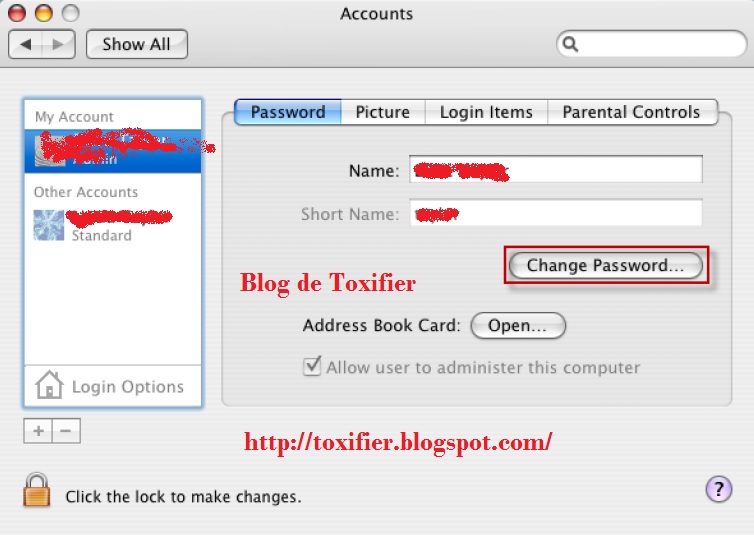
The following steps will help you change your Account password. It is a good practice to regularly change passwords.
  • From the Apple menu, choose System Preferences. From the View menu, choose Accounts and select the user name whose password you want to change.
  • Click Reset Password(Mac OS X v10.3/v10.4) or Change Password(Mac OS X 10.5+).
  • Enter a new Password in both the Password and Verify fields. Click Reset/Change Password again.
  • If a dialogue box appears with a message Your Keychain password password will be changed to your new account password, click OK.


Creating Accounts


Always make sure that an account is not shared by several users. Try and make separate accounts for separate users. This makes the things private for each user, i.e. their Home Directories stay private and hidden from each other. Individual accounts thus maintain accountability. Administrator users should use their administrator accounts ONLY for administrative purposes.


Secure the Guest Account


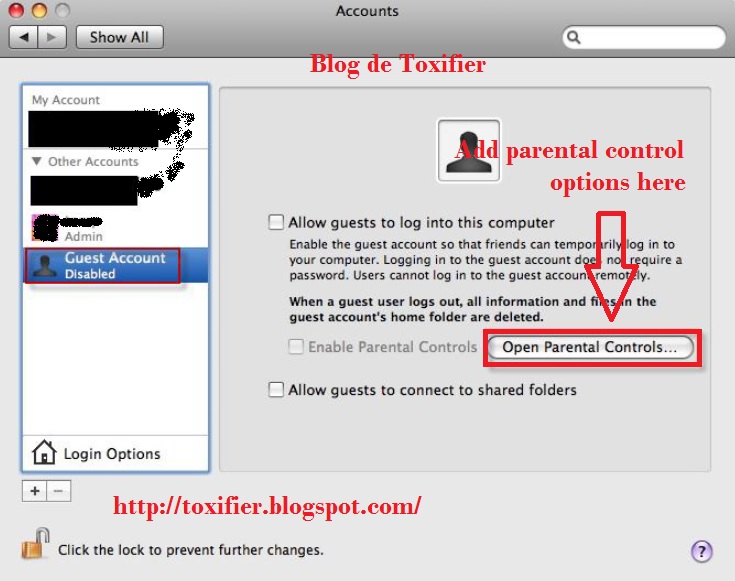
Guest Account should be used only for temporary access to the system. The guest account should be disabled by default as it does not require a password to login to the computer. If the guest account is enabled, enable the Parental Controls to limit what the users can do. If the user permits the guest account to access the shared folders, then an attacker can easily attempt to access shared folders without a password.


Controlling Local Accounts with Parental Controls


  • Open the System Preferences and click Accounts
  • If the lock icon is locked, click the lock icon and enter the Administrator name and password.
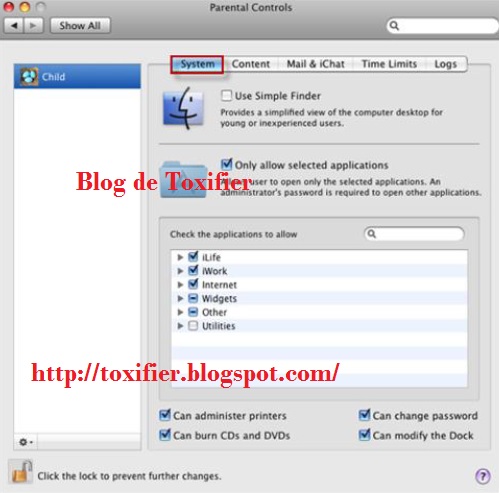
  • Select the user account to be managed with parental controls and check the Enable Parental Controls box.
  • Click Open Parental Controls..., click System, Content, Mails & other messages, Time Limits, and the number of logs and the set the values as required.


Use Keychain Settings


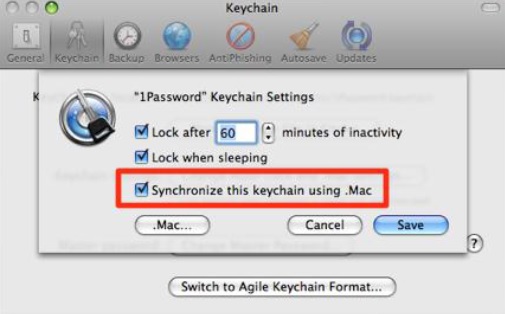
A keychain stores passwords on a disk in an encrypted form and it is difficult for non-root user to sniff a password between applications.

  • Click Applications -> Utilities -> Keychain Access -> Edit -> Change Settings for keychain "login"
  • Check lock after, change minutes of inactivity to desired minutes, check Lock when sleeping, and click Save.


Use Apple Software Update


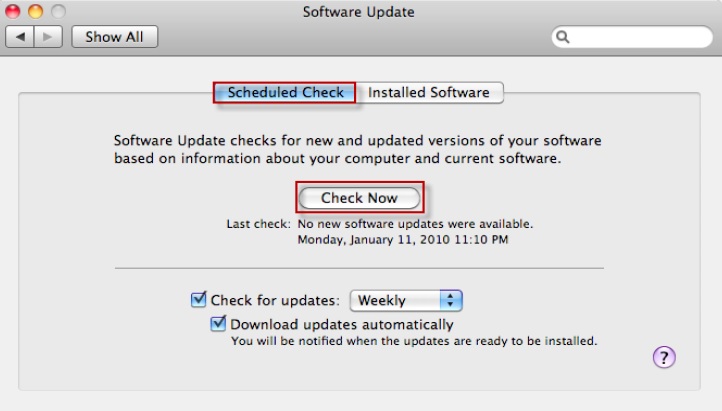
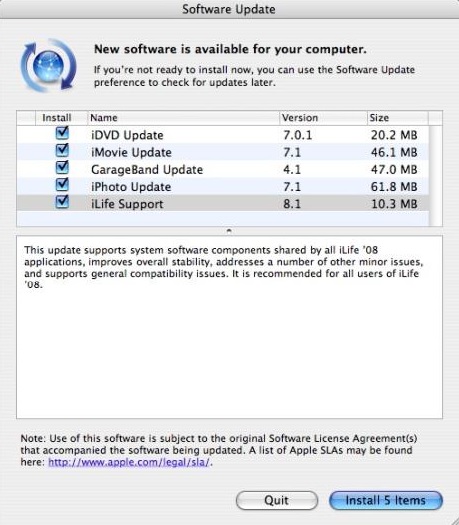
Mac OS X includes an automatic software update tool to patch the majority of Apple Applications. You might think of it being similar to the familiar Windows Update, or Microsoft Update to be precise. Software Update often includes important security updates, which should be applied to the user's machine. To navigate the software update:

  • Open software update preferences and click the Scheduled Check pane.
  • Check download important updates automatically and Check for updates.


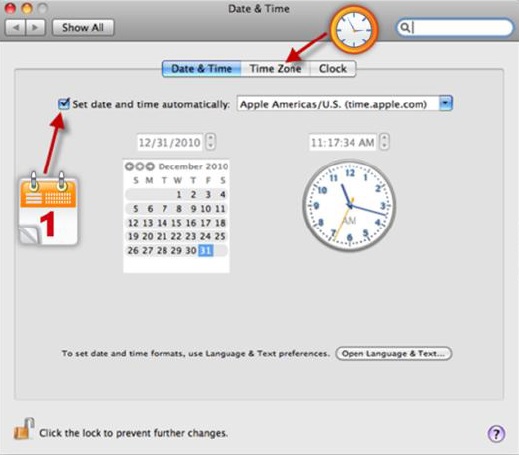
Securing Date and Time preferences


Open Date & Time preferences. In the Date & Time pane, enter a secure and trusted NTP server in the set Date & Time automatically field. Click Time Zone button -> Choose a Time Zone.


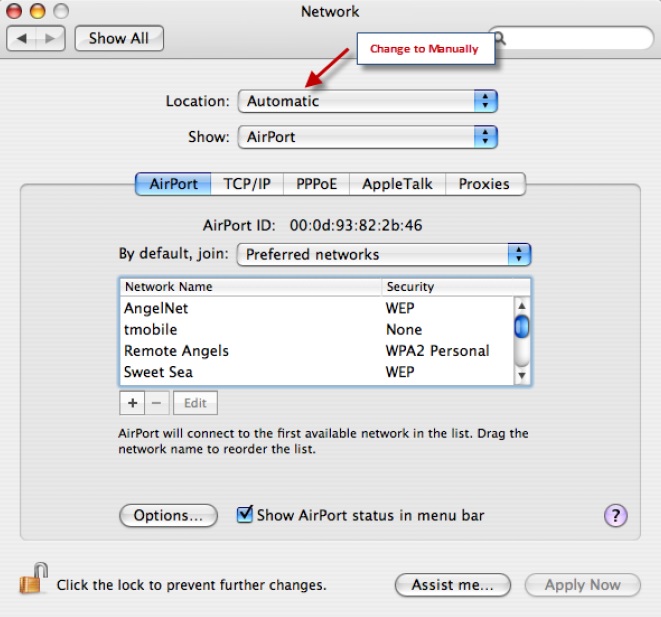
Securing Network Preferences


It is recommended to disable unused Hardware devices listed in Network Preferences.

  • Open Network Preferences. From the list of Hardware devices, select the hardware device that connects the network.
  • From the Configure pop-up menu, choose Manually.
  • Enter the user's static IP Address, subnet mask, router, DNS server, and search domain configuration settings.
  • Click Advanced. In the configure IPv6 pop-up menu, choose Off and then click OK.


Enable Screen Saver Password


To prevent unauthorized access to the system, enable screen saver password.

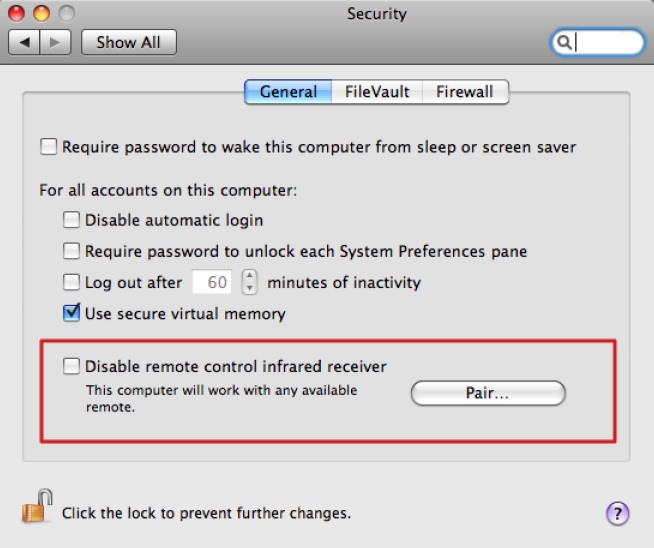
  • From the Apple menu, select System Preferences, click Security, and click the Lock icon to make changes.
  • If prompted, type the admin user name and password
  • In the Security window, click the General tab and check Require password to wake this computer from sleep or screen saver(Leopard) or Require password immediately after sleep or screen saver begins(Snow Leopard).
  • In addition to this, secure the system by selecting: Disable Automatic login, Require password to unlock each System Preference, Use secure Virtual Memory, Click the lock icon to prevent further changes.
  • Close the Security Window and restart your machine.


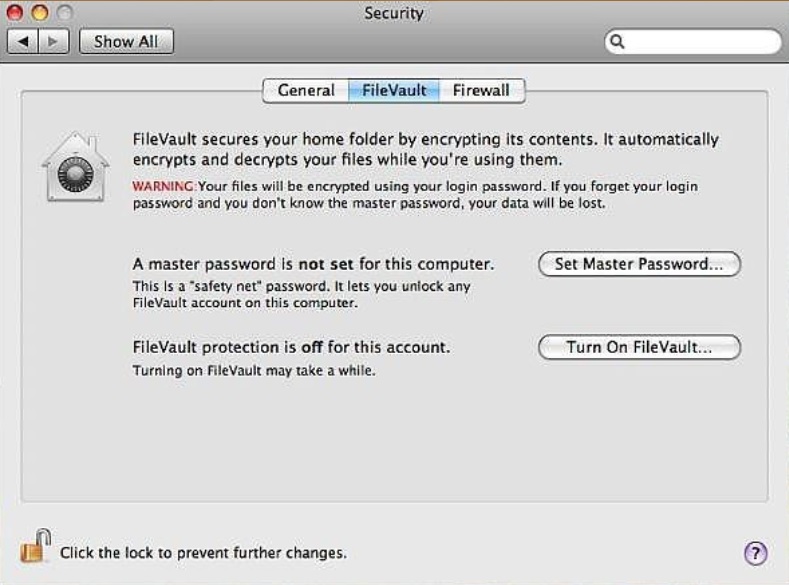
Set up FileVault to keep Home Folder Secure


Steps to setup File Vault:

  • Click System Preferences -> Security -> FileVault -> Set Master Password.
  • Create the master password for the Computer, but ensure that that this password is different from the user account password.
  • Verify the password and Click OK


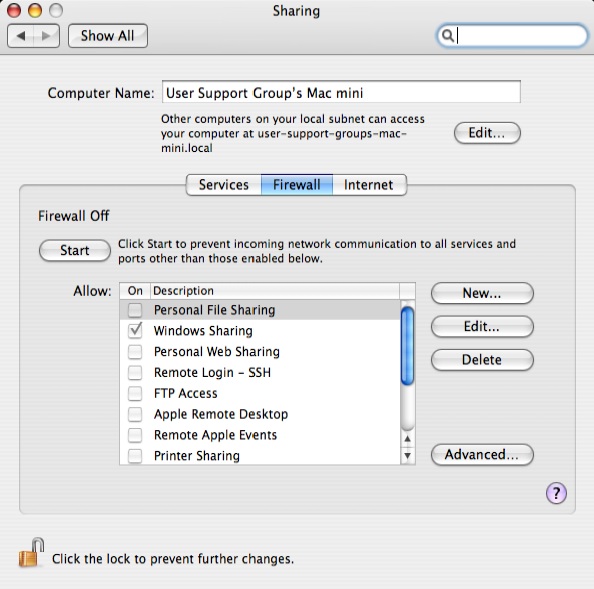
Firewall Security


Firewall should be used to block unauthorized programs from accepting new network connections. To improve the firewall security:

  • Click System Preferences -> Security -> Firewall
  • Click the lock icon to make changes.
  • If prompted, type the admin user name and password.
  • By deafult, the firewall allows all incoming connections, change the option by clicking the second (Allow only essential services) or third option (Set access for specific services and applications).
  • Now choose which application(s) you want the firewall to allow and which to block.
  • Click the lock icon to prevent further changes and close the security Window


Thursday, July 18, 2013

Guidelines for Securing Operating SystemPart 2 - Microsoft Windows


Hey all! Welcome back to my blog on this nice Thursday evening. Let's continue with our yesterday's discussion. As promised, I am coming up with a post on Guidelines specific for Microsoft Windows Operating System. Similarly I'll make a post about Mac OS, and one about the configuration of Windows Firewall.

Please note: This post is quite specific to Windows 7.


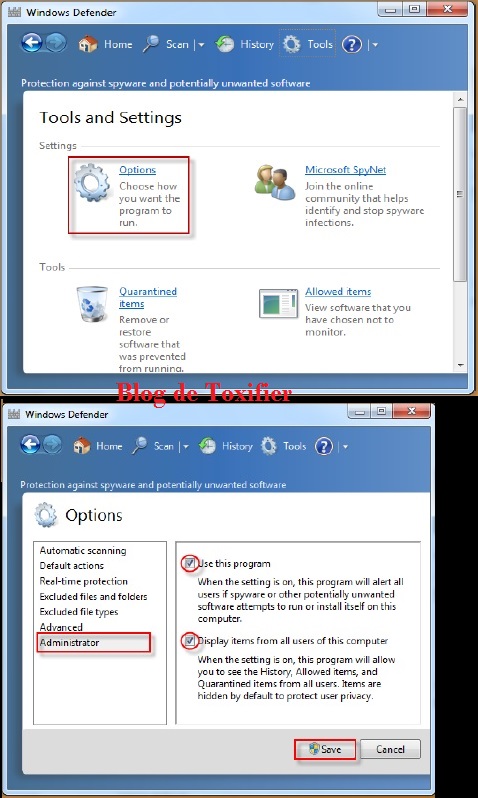
Turn on Windows Defender


This will help prevent malware from entering your system. Though I agree it is not an antivirus but keeping it turned on with an AntiVirus doesn't make things irritating. It rather secures. I know it is advertised that don't turn on more than one antivirus, and it is true, but running Windows Defender beside your regular AntiVirus doesn't irritate. Though if your Security Solution has Anti-Spyware, etc. too then you can safely turn Windows Defender off.


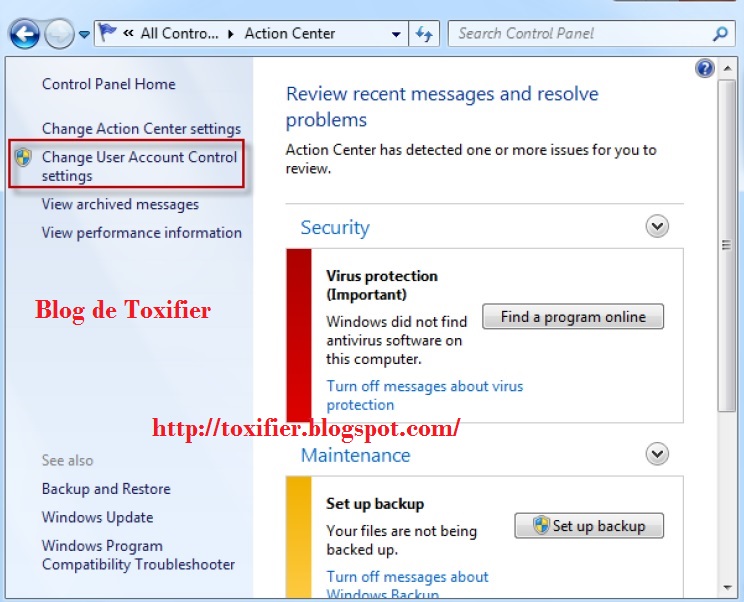
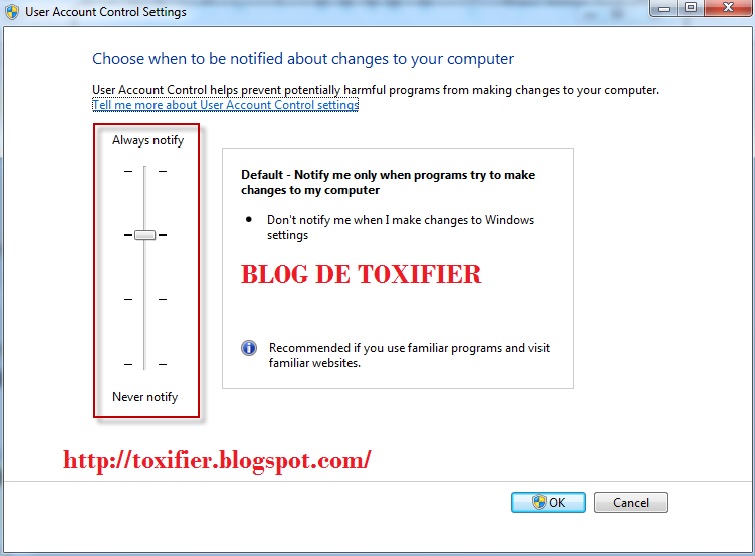
UAC - User Account Control


A great feature that came with Windows Vista and there since then is the UAC. User Account Control asks for permissions before installing anything on your system, and at times when you open certain programs which are generally associated with higher privileges and might damage your system if not used with care, or are potentially harmful otherwise.


Backup your Files


Windows backup is quite a handy tool. You can use Acronis True Image or Norton Ghost too. For network backups you can use Symantec Ghost. Backups make you safe from hardware and software failures. In case of attacks on your system, or virus infection backups make you have a copy of all important data. Backups are of many kinds. I'll discuss that in another post :)


Windows Update


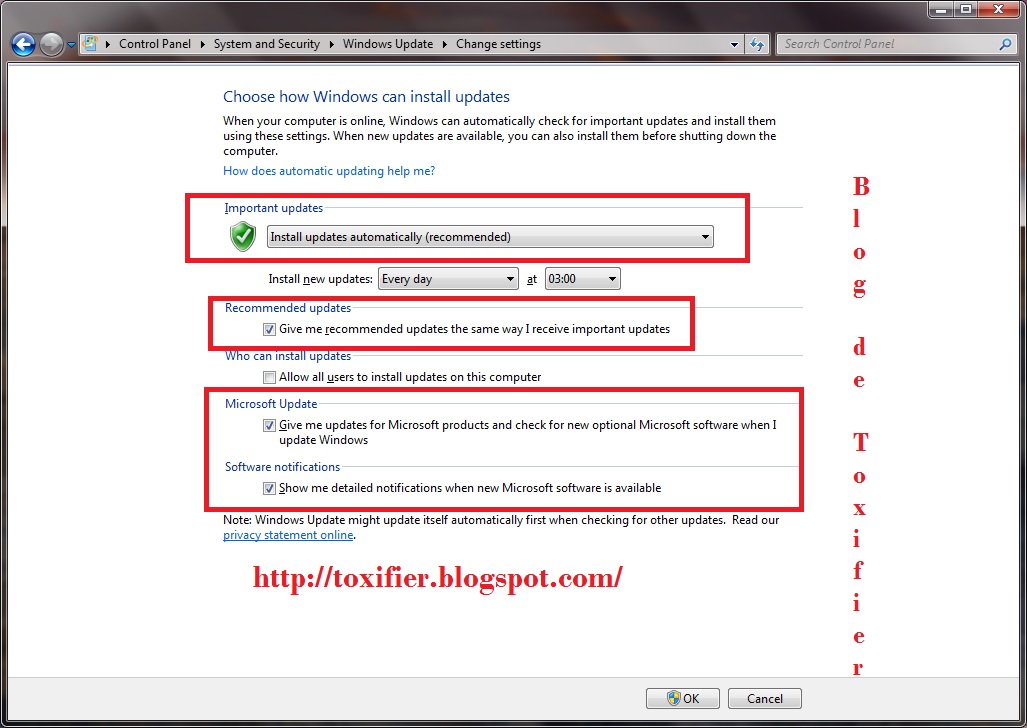
As I said in my last post too updates are really necessary. They fix issues that are identified by testers and users. Patches and Updates from the vendor's own site are trustworthy and can be used safely over the third party ones. Windows Update helps fix many issues. It updates Microsoft software on your system too. At times, it also provide fixes and drivers for your most Non-Microsoft Hardware too.


Windows Firewall


Keep your Windows Firewall on. It helps prevent most Internet based attacks by blocking most inbound connections and suspicious outbound ones too. As I said I'll do a detailed discussion on Windows Firewall and it's configuration in a separate post later. For now just turn on your Windows Firewall using the Action Center of your Windows 7 PC.


Action Center


You did notice that flag icon on your taskbar right? That is the Action Center. It notifies you of most events happening in your computer. The best way is to raise the bar of Action Center Notification which would make you sure of whatever any software or you yourself are trying to do with your PC.

Disable the Guest Account


Guest account can be used by hackers to gain access of your computer. Always keep it disabled if you don't use it.

Rename the Administrator Account


Rather rename all the accounts after their creation. This would make you even secure. Actually, your username and your Home Folder have the same name. Renaming your user doesn't change the Home Directory name. Thus, makes things more secure.

NTFS AND EFS


Always use NTFS file system and not the FAT32. It is more secure and also has various other advantages. For example, FAT32 supports file sizes upto 4 GB, but NTFS supports more than that.

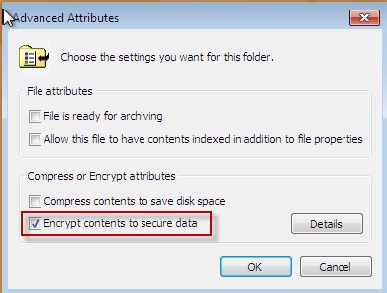
EFS is the Encrypted File System. It helps encrypting the File System and this makes the data more secure. To use encryption, Right Click on the File/Folder you wish to Encrypt. Select Properties. Select General Tab. Click Advanced Button and following dialog box appears:


Just select your desired option. In a similar way you can decrypt by just unchecking the option.

Kill unnecessary Processes


Sometimes processes are running which you never initiated. I am not talking about system processes but normal processes which are generally user-initiated. You should kill such processes. For example, many hackers migrate themselves to Notepad.exe and the user is unable to identify the hacker in their system.

Enable BitLocker


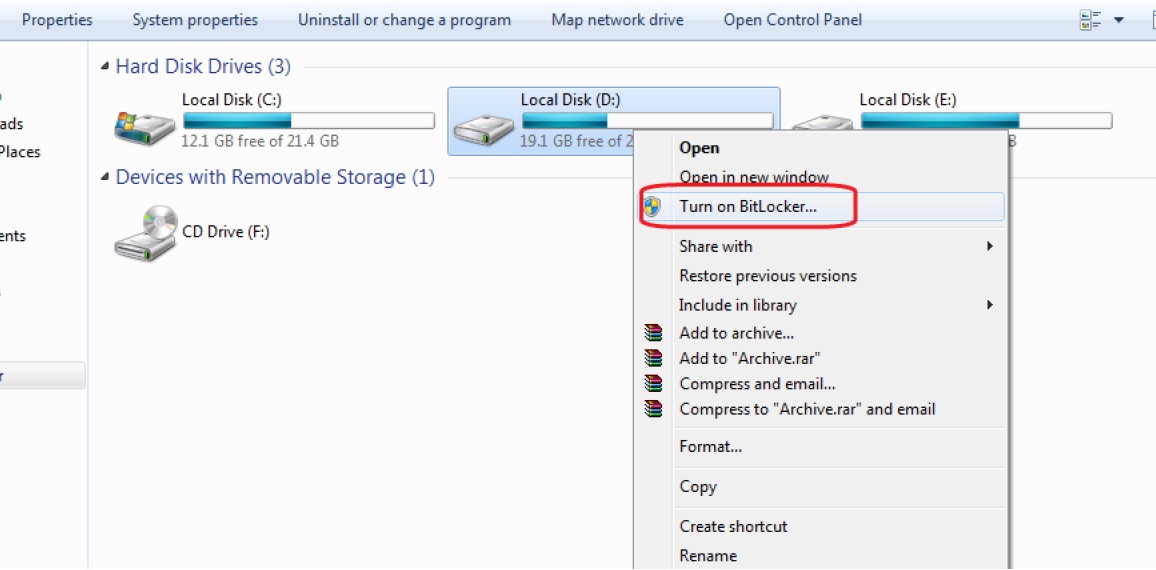
So far Bit Locker has not been bypassed by any attacker as far as I know. Thus, it is the most safe solution to go for, if you use Ultimate Version of Windows.


Disable StartUp Menu


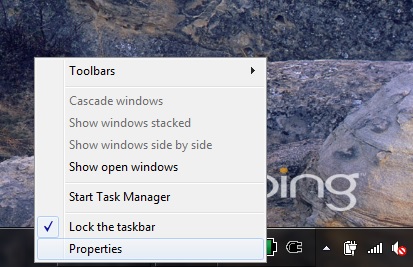
To do this, Right click on your Taskbar. Select Properties.


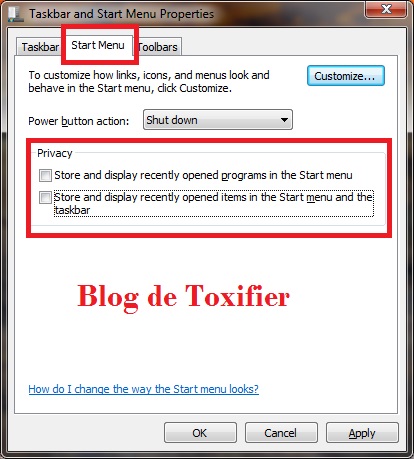
Click on Start Menu Tab. Uncheck both "Store and Display Recently Opened Programs in Start Menu" and "Store and Display Recently Opened Items in the Start Menu and the Taskbar"


In case any image is unclear click to enlarge it. I hope you all find this post useful. Hope to see you all soon again. All comments and suggestions are welcomed. Have a great evening!

Wednesday, July 17, 2013

Guidelines for Securing Operating System Part 1 - Random Wednesday

Hey all my dear friends!! Happy Wednesday!! :D I hope you all are doing great! :)


I thought to share some "guidelines" for securing your operating system. As you know security is becoming a great issue in this era of Internet, and thus we must try and secure our computers which may or may not contain important information. A computer that has such information is at risk since such information could be stolen. A computer without such sensitive data is at risk of being a Zombie Computer.


A zombie computer is one which has has been taken over by an attacker and the owner may not be aware of it. In computer science, a zombie is a computer connected to the Internet that has been compromised by a hacker, computer virus or trojan horse and can be used to perform malicious tasks of one sort or another under remote direction. Botnets of zombie computers are often used to spread e-mail spam and launch denial-of-service attacks. Most owners of zombie computers are unaware that their system is being used in this way. Because the owner tends to be unaware, these computers are metaphorically compared to zombies.


For professionals it is the job of Administrators, etc. But home users are left alone. In such a scenario we must take steps to ensure our safety in this super-networking world. Thus, through my knowledge I am trying to put together some guidelines that I recommend you all should follow. These are simple, everyday tasks that won't take much time, but would secure you to a nice extent. At times you might think that these guidelines are quite basic, but according to surveys and reports, most of the users(more than 60%) don't follow more than 2 or 3 of these. So please try to go through all these. If you need any help regarding any of these, you can place a comment on this post. I always reply to the comments(within 48 hours) and would try my level best to help you out.

Let's begin :)


Regularly update Operating System and other Applications


This is something you hear everyday. That irritating Windows Update flag would appear regularly until you update or get rid of the notification. It is though quite recommended to update regularly. I would like to give you an example. Internet Explorer v7 to v9 are quite vulnerable. If you didn't update it to v10 yet, and use it, it is quite a big security flaw at your end. Internet Explorer 10 is quite secure in comparison to previous versions. For another example consider the latest Flash Player 11. If you didn't update as yet, do it now. Adobe has fixed some big security bugs :) Always try and keep software up to date and download the updates preferably from the vendors own website.

Install Antivirus Software and scan your system regularly. Always scan files downloaded from Internet before opening them


Okay, I did a Comparison of Free Anti Virus software last year. You can check that post here. I think I'll have to do another review soon. Anyways, paid alternatives are much better but for general purpose and normal people a free antivirus is good enough. Please note I said "good enough" not "best", okay? Make sure you update your anti-virus software and scan your computers regularly.

Another recommended thing is that you should scan all removable devices before opening them. Moreover if your antivirus supports, check the option that force scans all removable devices when they are connected to computer before letting you access it. This would save you from many threats including the big Autorun one. Bitdefender has a feature wherein it immunizes the removable media to such Autorun viruses. Such things come in handy.


Donot open emails sent by unknown people


I should rather say email attachments. The emails aren't that irritating as the attachments ans links enclosed. The links can lead you into a trap and the attachments can be as good as a virus! Though we know antivirus scans occur before an attachment is downloaded, but please! they can all be bypassed. The viruses these days are highly encrypted.

Lock the system when not in use


There are several ways in which you can do this. The most simple one is press [Windows]+L on your keyboard. This would lock user without logging you out. Thus any processes running will continue to run, but if you wish to interact with PC, you need to log in again, rather you need to reauthenticate yourself. This helps locking out the unwanted and unauthorized users. Other methods of locking are illustrated in following pics:


Physically secure system from unauthorized people


You can use locks in your laptops. A popular one is Kensington Lock. Other ways you can think of I guess LOL! :D


Enable Firewall protection


Most of the purposes can be solved easily by the Windows Firewall. It is quite effective and has tonnes of options you never thought they exist in Windows Firewall too! Yes, if you'll read about it you'll know Windows Firewall is quite a nice tool. I will discuss about it in a separate post later.


Use strong passwords


Long ago I made a post regarding strong passwords. I guess you must consult that. Link Here. Your password should be at least 8 character long and contain numbers, alphabets(lower and upper case) and special characters too. A password of length 18 is close to unbreakable with today's equipment as the breaking software would take many years to crack it with current equipment.


Keep your browser clean


Delete the browser cookies and temporary files, cache, logs, auto-complete and forms history, browsing history, regularly. This helps in ensuring a little more security. The cookies are no longer the client side information sotrage files only, they are now small yet powerful spyware tools that are being used by websites and servers to track you. This is good in sense that you get targeted ads, but bad when the cookies can be unsafe. Try and not save cookies whenever possible and delete them when you exit browser. I discussed CCleaner the other day(link of the post here). It is quite a handy tool for this.


Use secure networks only


Don't fall into traps! Don't be lured by free WiFi! These could be Fake Access Points and harm your computers. They can log your activity, redirect you to undesired websites, etc. Try to connect only to secured networks and that too the ones you are aware about. Don't just connect to any rogue or nomad networks for free Internet.


Apart from all this, make sure you make timely backups of most important data at least if you think you can't backup everything. This would help you have a backup copy of data in case of any disaster that occurs due to your bad fortune, or a hacker's good one! :P Also limit the number of user accounts to minimum. Disable guest account too. I will make another post. I will discuss this in that. So I have to make a post about Windows Security, one about Mac OS Security, one about AntiViruses, and one about configuration of Windows Firewall. That totals 4 more posts! :D That'd be fun, haha! :D 2 will be parts of this, i.e. Part 2 and Part 3. Other two will be separate posts.

So I gotta go now. I hope you all like what I shared and find it useful. Also try to abide to these guidelines and stay safe and secure on the Internet! :) Have a great evening everyone. See you all soon again :D